Home

Our Robotic Inventions — In the Public Domain

Some parts inside them may be patented or registered trademarks — verify first.

We provide our inventions in detail, patent free.

Inventions

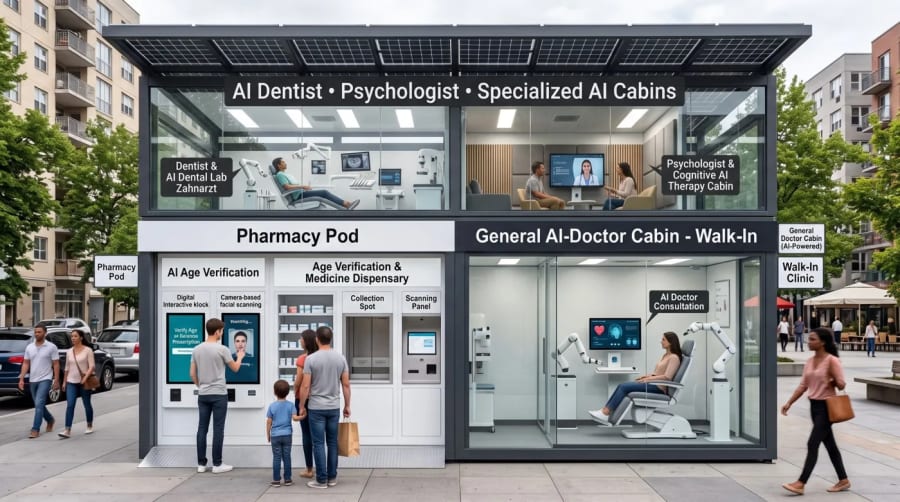
Urban AI healthcare pod 1

Urban AI healthcare pod

First published: October 19, 2026 · LinkedIn

A walk-in street clinic: a solar-powered automated pharmacy, an AI general practitioner, a digital dentist and a virtual psychologist in one pod. You verify your age and ID, consult a specialised AI and receive your medication from the pod.

Design · Technology · How to use
Design
  • Two-storey modular pod with glass walls on a steel frame, set on a pavement or a square, with a flat solar roof.
  • Ground floor: the Pharmacy Pod and the walk-in General AI-Doctor Cabin.
  • Upper floor: a dentist cabin with an AI dental lab, and a psychologist and cognitive AI therapy cabin.
  • Every cabin is clearly signed from the street.
Technology
  • Pharmacy: digital interactive kiosk, camera-based facial scanning for AI age verification, a medicine dispensary, a collection spot and a scanning panel.
  • AI-doctor cabin: a treatment chair between two robot arms, a screen for the AI consultation and medical devices.
  • Dental cabin: a dental chair with a robot arm, X-ray screens and the AI dental lab.
  • Therapy cabin: a quiet lounge with a large video screen for sessions with a virtual psychologist.
  • Solar panels on the roof power the pod.
How to use it
  1. Walk in — no appointment needed.
  2. Verify your age and ID at the kiosk with the face scan.
  3. Consult the specialised AI in the matching cabin: doctor, dentist or psychologist.
  4. Scan the prescription at the panel and take your medication from the collection spot.
Hyper-local neighbourhood delivery system 1Hyper-local neighbourhood delivery system 2Hyper-local neighbourhood delivery system 3

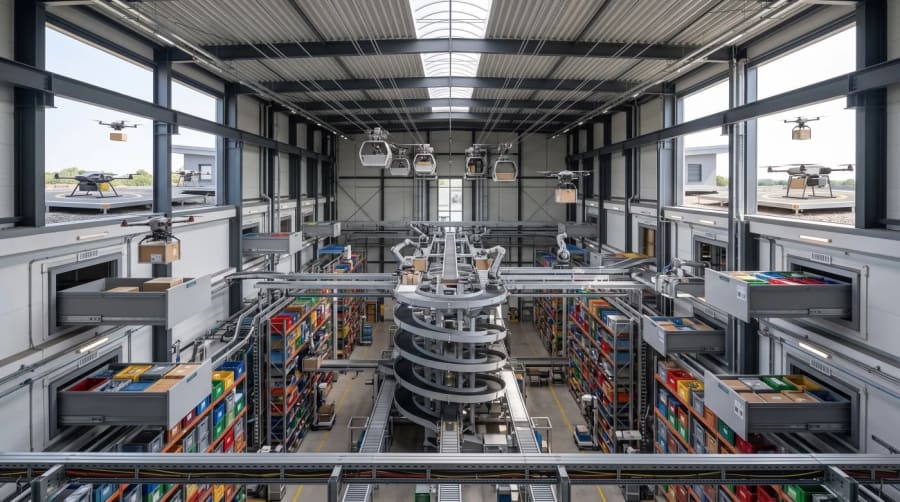
Hyper-local neighbourhood delivery system

First published: October 19, 2026 · musk.us.org · LinkedIn

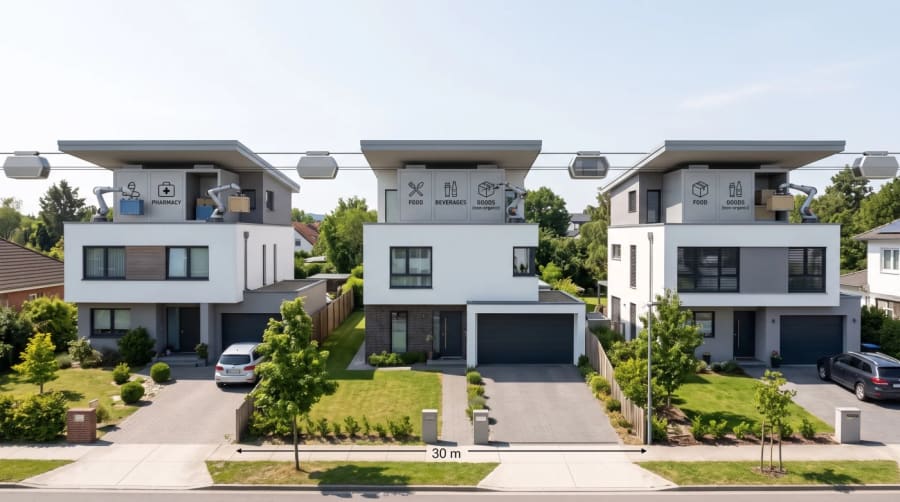
Autonomous trucks and drones restock a neighbourhood dispatch center. Cabled drones carry food and goods to rooftop stations, where a robot arm sorts them into lockers for food, beverages, goods and pharmacy, and a ceiling robot stores them in the home. Unused items go back, families pay only for what they consume, and centers trade surpluses with each other.

How it works
  1. Automated Restocking: Supermarkets no longer rely entirely on foot traffic. Instead, they deploy autonomous trucks and heavy-lift drones to bulk-deliver inventory directly to your local neighborhood dispatch center.
  2. Cabled Micro-Delivery: From the local dispatch center, food and goods travel to individual homes via a continuous network of cabled drones.
  3. The Home Ceiling Robot: Inside the home, a ceiling-mounted robotic arm receives the payload directly from the automated dispatch-pod, organizing the goods seamlessly into the family’s intelligent storage walls.
  4. Dynamic Billing & Returns: Your kitchen knows your meal prep schedule. If a family’s recipe plans change and consumption of a certain item drops, the ceiling robot packs the unused ingredients back into the pod. The food is sent back to the dispatch center, and the family is strictly charged only for what they actually consumed.
  5. Neighborhood-to-Neighborhood Trading: Dispatch centers operate as autonomous trading floors. If one neighborhood has a surplus of a product and another faces a shortage, the centers communicate and trade with each other automatically based on attractive pricing.
  6. Families as Micro-Merchants: The consumer is now an active market participant. Families can purchase bulk or specialty goods, hold them in their automated home storage, and sell them back into the neighborhood system later for cash if they want to offload inventory.
Robot trunk loading with a community bay 1

Robot trunk loading with a community bay

First published: October 15, 2026 · LinkedIn

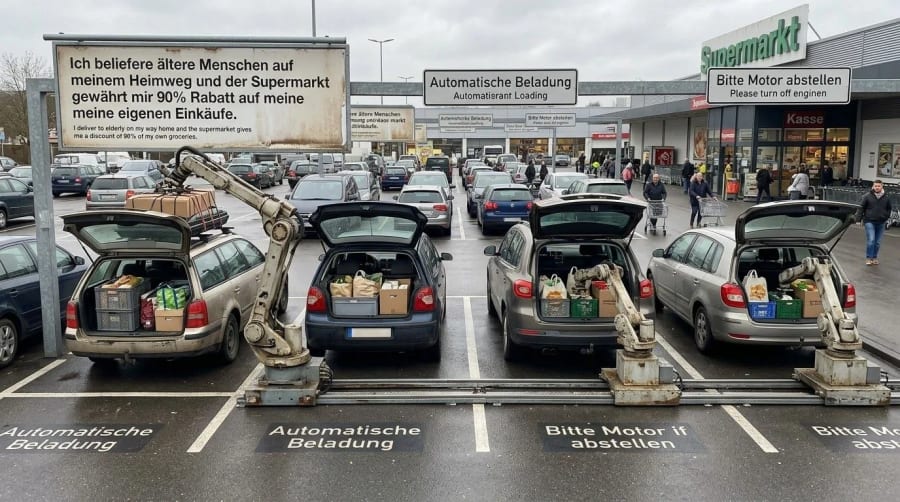
At the supermarket, robot arms load groceries straight into the car trunk; a dedicated bay is for community drivers who deliver to elderly neighbours and get a discount on their own shopping.

Design · Technology · How to use
Design
  • Supermarket car park with bays marked “Automatische Beladung” (automatic loading) and signs asking drivers to switch off the engine.
  • Robot arms stand on rails in the ground between the bays, so one arm can serve several cars.
  • A separate bay with a large sign is reserved for community drivers.
Technology
  • The rail-mounted arm moves along the bays and lifts crates and boxes into the open trunk — or onto a roof rack.
  • The supermarket links the community bay to a discount on the driver’s own shopping.
How to use it
  1. Park in a loading bay, switch off the engine and open the trunk.
  2. The arm loads your shopping — no heavy lifting.
  3. As a community driver, use the dedicated bay, take shopping for elderly neighbours along on your way home and get a discount on your own groceries.
Beverage bottling station at the checkout 1

Beverage bottling station at the checkout

First published: October 16, 2026 · LinkedIn

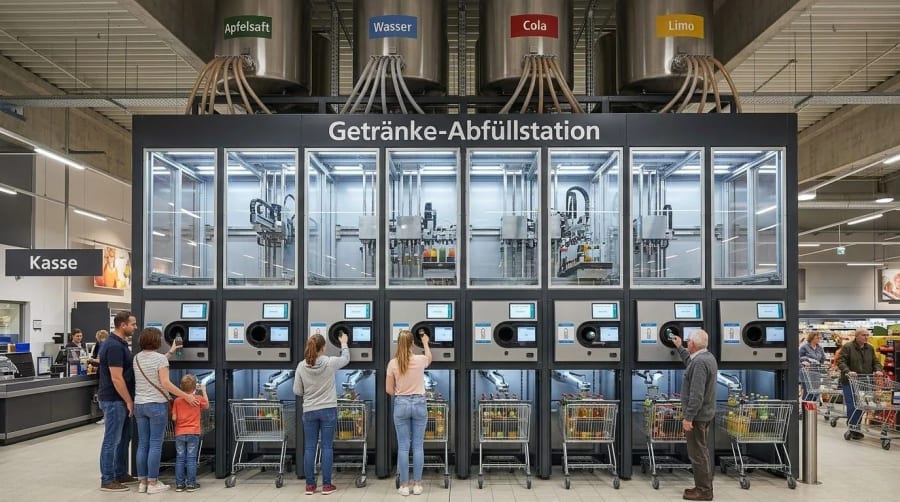
Ceiling-mounted bulk tanks feed an 8-station array that washes, fills, carbonates and seals returnable bottles on demand. Customers scan their order and a robot arm puts the drinks into their cart.

Design · Technology · How to use
Design
  • A steel frame next to the checkout with 8 glass-fronted bottling cells in a row.
  • Four bulk tanks hang from the ceiling — Apfelsaft (apple juice), Wasser (water), Cola and Limo (lemonade) — and feed the cells through hoses.
  • Each station has a touch screen, a bottle opening and a bay for a shopping cart below.
Technology
  • Each cell washes, fills, carbonates and seals the bottles; the 8 cells work in parallel.
  • A robot arm under each cell puts the filled bottles into the cart.
  • Stock is held overhead instead of on shelves; returnable bottles keep the loop closed.
How to use it
  1. Push your cart into the bay under a station.
  2. Return your empty bottles, scan your order and choose your drinks on the screen.
  3. The robot arm loads the drinks into your cart; you pay at the checkout next to it — no heavy packs to lift.
Supermarket refilling pod 1

Supermarket refilling pod

First published: October 14, 2026 · LinkedIn

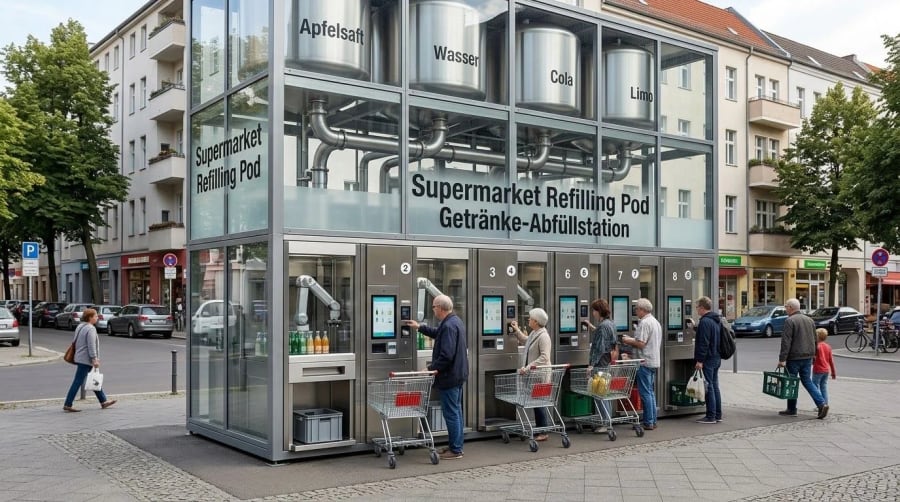
A neighbourhood pod with bulk ceiling tanks and 8 bottling stations: drop off your empty bottles and the system sanitises, fills, carbonates and caps them in seconds — no new plastic.

Design · Technology · How to use
Design
  • A free-standing glass tower on the pavement: four bulk tanks on top (Apfelsaft, Wasser, Cola, Limo), visible behind glass, with pipes down to the stations.
  • 8 numbered stations at street level, each with a touch screen, a terminal, a bottle window and space for a crate or a cart.
Technology
  • The tanks feed every station; each station sanitises, fills, carbonates and caps the bottles in seconds.
  • A robot arm inside each station handles the bottles and hands them out through the window.
How to use it
  1. Bring your empty bottles in a crate or a cart.
  2. Go to a free numbered station, choose your drink on the screen and pay at the terminal.
  3. Hand in the bottles; take them back clean, filled and capped from the window — no new plastic.

Classroom AI teaching robot

First published: October 23, 2026 · RA | AI | RO SI Training

A robot teacher moves on a ceiling rail in front of the board, with two screen faces and two arms. It explains, points and answers — and the classroom keeps no recordings.

Design · Technology · How to use
Design
  • A robot on a ceiling rail in front of the whiteboard: an upright body, two arms and two screens that show faces.
  • A normal classroom stays as it is: desks, laptops, lab benches, a large screen and ceiling cameras.
  • A sign on the wall states the privacy rule of the room.
Technology
  • The rail lets the robot move across the front of the room and turn to the class or the board.
  • The face screens show the AI teacher; the arms point at the board.
  • Privacy by design: no audio recordings or transcripts leave the classroom server, and all data except grades, the students’ work and opinions on it is deleted when the class ends.
How to use it
  1. Students sit as usual with their laptops.
  2. The robot teaches at the board and answers questions.
  3. At the end of the class only grades and work remain.

Museum guide robots

First published: October 23, 2026 · RA | AI | RO SI Training

At each spot on the wall, 4 or 5 works of the same artist are stacked. The overhead robot system hides the front picture and brings out the next one, while a humanoid robot dressed as the artist — like Leonardo da Vinci next to the Mona Lisa — comments on each work live. Visitors listen through headphones.

Design · Technology · How to use
Design
  • At each spot on the gallery wall, 4 or 5 works of the same artist are mounted one behind the other.
  • An overhead robot system on gantry rails runs along the walls above the pictures.
  • In front of each artist’s spot stands a humanoid robot dressed as that artist — for example Leonardo da Vinci next to the Mona Lisa, or a Picasso figure next to his paintings.
  • A barrier in front of the works with lit headphone stations.
Technology
  • The overhead robot system hides the front picture and brings the next work of the same artist forward — so one wall spot shows 4 or 5 pictures instead of one.
  • The robot “artist” comments on each picture live while it is shown, with gestures of its robotic hands.
  • Each headphone station plays the artist’s commentary, so the hall stays quiet.
How to use it
  1. Walk along the barrier and plug in at the station of an artist.
  2. The “artist” comments on the picture in front of you.
  3. The robot system changes to the next work, and the commentary continues — 4 or 5 pictures at one spot.

Hands-on robotics training lab

First published: October 23, 2026 · RA | AI | RO SI Training

A training hall where every desk has a small robot arm, a robot kit and a laptop. The trainer explains with holographic projections — an AI brain, code, robot plans — while drones fly overhead.

Design · Technology · How to use
Design
  • A large hall (here a former factory) with long rows of desks; on each desk a small robot arm, a robot kit and a laptop.
  • A raised platform for the trainer in the middle of the room.
Technology
  • Holographic projections above the room show an AI brain, program code and robot plans.
  • Desk robot arms and drones are programmed from the laptops.
How to use it
  1. The trainer explains a concept with the projection.
  2. Each participant programs their own robot arm on the desk and tests it right away.

What “public domain” means

Anyone may use, copy, build and improve these designs without asking us. They should mention us as the original inventors. No fees are due.

If a company claims a patent on one of these designs: a patent filed after our publication is not valid.

Legal basis

A patent is only granted for an invention that is new. Everything made available to the public before the filing date — including our publication — is “state of the art”. A patent on it lacks novelty and can be revoked or declared void.

  • Europe (EPO): European Patent Convention, Art. 52(1), 54(1)–(2), 100(a), 138(1)(a)
  • Switzerland: Patentgesetz (PatG, SR 232.14), Art. 1, 7, 26
  • Germany: Patentgesetz (PatG), §§ 3, 21, 22
  • USA: 35 U.S.C. § 102(a)(1), § 282(b)
  • Andean Community (CO, EC, PE, BO): Decision 486, Art. 16, 75